Documentation
Creation
Important

After creating the project and activating the virtual environment, you can start. To start create documentation, you must install Sphinx
⏩️ Install Sphinx
pipenv install sphinx
⚙️ Creating the documentation layout (docs)
sphinx-quickstart docs
This will present to you a series of questions required to create the basic directory and configuration layout for your project inside the docs folder. To proceed, answer each question as follows:
Separate source and build directories (y/n) [n]: y
Project name: Orange County Lettings
Author name: Laurent Jouron
Project release []: 0.1
Project language [en]: Leave it empty (the default, English) and press Enter.
Project
After the last question, you will see the new docs directory with the following content.
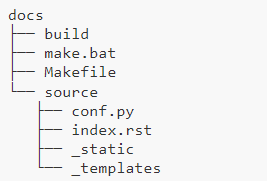
The purpose of each of these files is:
💡build/
An empty directory (for now) that will hold the rendered documentation.
💡make.bat and Makefile
Convenience scripts to simplify some common Sphinx operations, such as rendering the content.
💡source/conf.py
A Python script holding the configuration of the Sphinx project. It contains the project name and release you specified to sphinx-quickstart, as well as some extra configuration keys.
💡source/index.rst
The root document of the project, which serves as welcome page and contains the root of the “table of contents tree” (or toctree).
⚙️ Build docs/build/
Thanks to this bootstrapping step, you already have everything needed to render the documentation as HTML for the first time. To do that, run this command:
sphinx-build -M html docs/source/ docs/build/
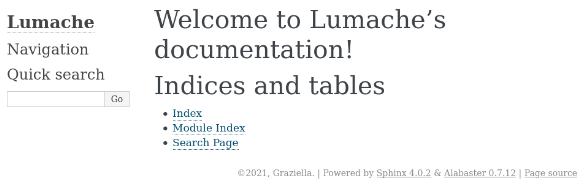
And finally, open docs/build/html/index.html in your browser. You should see something like this:
⏩️ Position yourself in the docs folder
cd docs
⚙️ make html
This command must be retained because this command will be repeated with each modification.
.\make html
.readthedocs.yaml
To realize this documentation I used this configuration for the file .readthedocs.yaml
⚙️ .readthedocs.yaml
# Required
version: 2

# Set the OS, Python version and other tools you might need
build:
os: ubuntu-22.04
tools:
    python: "3.12"

# Build documentation in the "docs/" directory with Sphinx
sphinx:
configuration: docs/source/conf.py

python:
install:
    - requirements: docs/requirements.txt
conf.py
To realize this documentation I used this configuration for the file conf.py
⚙️ conf.py
# Configuration file for the Sphinx documentation builder.
#
# For the full list of built-in configuration values, see the documentation:
# https://www.sphinx-doc.org/en/master/usage/configuration.html

# -- Project information -----------------------------------------------------
# https://www.sphinx-doc.org/en/master/usage/configuration.html#project-information

project = "Orange County Lettings"
copyright = "2024, Laurent Jouron"
author = "Laurent Jouron"
release = "1.0.0"

# -- General configuration ---------------------------------------------------
# https://www.sphinx-doc.org/en/master/usage/configuration.html#general-configuration

extensions = [
    "sphinx_copybutton",
    "sphinx.ext.duration",
    "sphinx.ext.autodoc",
    "sphinx.ext.doctest",
    "sphinx.ext.intersphinx",
    "sphinx.ext.todo",
]

autodoc_default_flags = []

autodoc_modules = {
    "lettings": "lettings",
    "profiles": "profiles",
    "oc_lettings_site": "oc_lettings_site",
}

# The suffix of source filenames.
source_suffix = {
    ".rst": "restructuredtext",
    ".txt": "restructuredtext",
    ".md": "markdown",
}

# The master toctree document.
master_doc = "index"

templates_path = ["_templates"]
exclude_patterns = ["_build", "Thumbs.db", ".DS_Store"]

# The name of the Pygments (syntax highlighting) style to use.
pygments_style = "sphinx"
epub_show_urls = "footnote"


# -- Options for HTML output -------------------------------------------------
# https://www.sphinx-doc.org/en/master/usage/configuration.html#options-for-html-output

html_theme_options = {
    "display_version": False,
    "style_external_links": True,
}

html_theme = "sphinx_rtd_theme"
html_logo = "_static/logo.png"
html_static_path = ["_static"]
requirements.txt
To realize this documentation I used this configuration for the file requirements.txt
⚙️ requirements.txt
Sphinx==7.2.6
sphinx-rtd-theme==1.3.0
sphinx-bootstrap-theme
sphinx-copybutton